

Keepio: Projects, Notes, Tasks
Simple organizer, todo, focus
Project context
Personal project
My contribution
Founder
Why Keepio: Projects, Notes, Tasks exists
Organization apps ask you to build a system first. Databases, views, filters, a method to learn. Three weeks later, the app is still installed and the system has been abandoned.
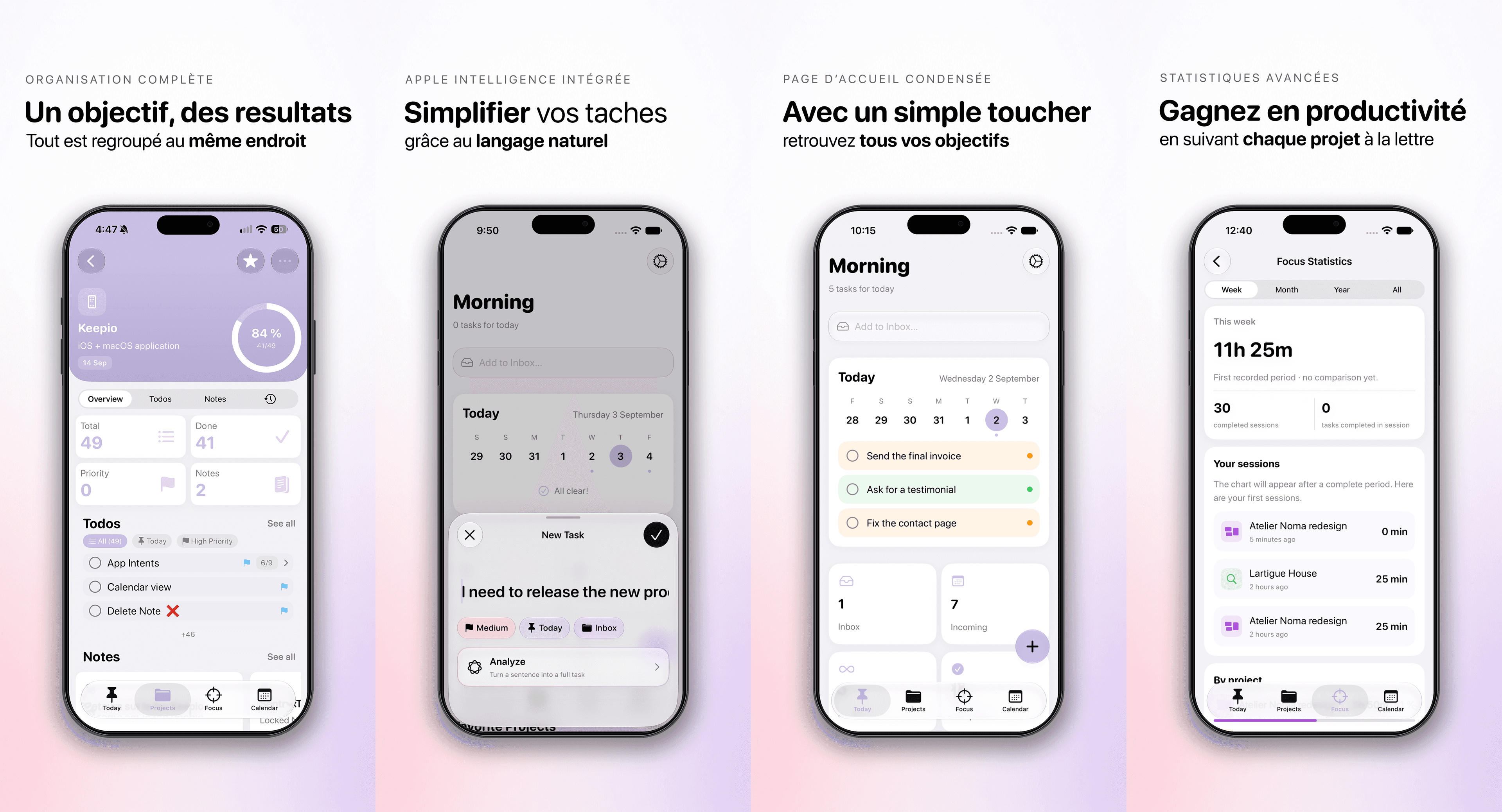
Keepio arrives assembled. A project holds its tasks, its notes, its files and its date. Nothing to set up before using it.
WHAT IT WILL NEVER ASK OF YOU No database. No imposed method, not GTD, not PARA. No views to configure, no filters to maintain. And no team: project sharing is not on the roadmap, Keepio stays a personal app.
WHAT APPLE INTELLIGENCE DOES Type "Send the invoice Monday #Client": the task lands in the right project, with the right due date and priority. A meeting note turns into a task list. Tags are suggested as you write. All of it runs on Apple's on-device model, with no text leaving the device.
WHAT A PROJECT HOLDS - Tasks with priority, due dates and recurrence - Rich text notes, with your files and images attached - A completion percentage that climbs with every checked task - Tags shared between notes and tasks - 9 Home Screen widgets and a Live Activity
ON ALL THREE DEVICES Everything runs through your iCloud account. A note taken on iPhone shows up on Mac. No account to create, no server other than Apple's. One purchase covers iPhone, iPad and Mac.
Keepio+ adds the focus timer tied to a project, the calendar view, templates and advanced widgets.
Product tour
Inside the app
Behind the scenes
The problem solved
My tasks lived in one app, my timer in another, and my projects nowhere at all. Nothing tied the hours I put in to what was actually moving forward — I could run session after session without knowing whether a project had advanced. Keepio starts from the project rather than the task. A clear list, one goal at a time. The Pomodoro is built in, so every session counts towards a specific project and leaves a trace behind it. Progress reads at a glance, deadlines stay in the calendar instead of becoming one more notification. Everything syncs across iPhone, iPad and Mac with no account to create.
Behind the scenes
A year of solo development, and two structural decisions I would make again exactly the same way. The first: no SPM modularisation. A single target, organised through enum namespaces — App.Project.Views.Editor, App.Todo.UseCases. The usual advice is to split into modules; on a solo project, the cost of managing those dependencies outweighed the benefit. Two external dependencies in total, one of which I wrote myself. The second: freezing schema versions rather than tidying them away. Fourteen frozen versions, V1 through V14, every one a lightweight migration, none ever deleted. When CloudKit-synced data lives on real people's devices, removing a past version means breaking the update for anyone who skipped a couple of releases. The part that hurt was cutting project sharing from the scope. The feature was built; I pulled it out of the interface to ship the release, keeping the data layer dormant and the whole implementation on a branch. Deciding to stop something that already works is harder than writing it. The business model pivoted along the way too, from a subscription to a one-off lifetime purchase, with existing subscribers keeping what they had paid for.
Lessons learned
- 01A solo project does not need the architecture of a ten-person team.
- 02You never delete a schema version: someone out there is still on the old one.
- 03Cutting a finished feature to ship is a decision, not a failure.
- 04Swift 6 strict concurrency is expensive to adopt and pays you back in bugs never written.
- 05Design tokens, no hardcoded values: that is what makes a visual redesign possible at all.
- 06A business model is tested like a feature, and corrected the same way.
The metrics
Under the hood
The technologies that power Keepio: Projects, Notes, Tasks and why I chose them.
 SwiftLanguage
Apple's native language, performant and type-safe.
 SwiftUIInterface
Declarative framework for native, reactive UI.
 SwiftDataPersistence
The successor to Core Data, natively integrated with SwiftUI.
 CloudKitSync
Automatic iCloud sync across all Apple devices.
 Apple Sign InAuthentication
Fast, secure sign-in with an Apple account, no password required.
 XcodeIDE
Apple's official development environment.
 WidgetKitWidgets
iOS widgets for quick access to ideas from the home screen.
 FoundationModelsAI
Smart suggestions based on your ideas and projects.
 App IntentsShortcuts & AI
Let users access Keepio features outside the app.
I also write about it
ios
safeAreaInset vs safeAreaBar en SwiftUI
safeAreaInset et safeAreaBar épinglent du contenu fixe en bord d'écran. Différences visuelles, pièges et guide pour choisir le bon modifier SwiftUI.
Read article→ios
Ajouter du tracking à Keepio sans trahir ses utilisateurs
Comment j'ai instrumenté Keepio avec Sentry et TelemetryDeck en respectant la vie privée : façade, Adapters, enum exhaustive et opt-in/opt-out différencié.
Read article→ios
Post-mortem : un an de Keepio
Bilan technique, business et humain d'une app iOS indie après 12 mois de développement solo.
Read article→ios
Abonnement vs achat unique : pourquoi j'ai changé le business model de mon app iOS
Pourquoi l'abonnement n'a pas marché sur Keepio, et comment elle est passée à un achat à vie à 9,99€.
Read article→Want to try Keepio: Projects, Notes, Tasks?
Download the app and share your feedback.